Affiliate Disclosure: We may earn a commission from qualifying signups.
How to Use Axiom Trade: Beginner Guide
How to use Axiom Trade step by step: sign up, deposit SOL, set Quick Buy and fees, find a token on Discover, make a first trade, and track it in Portfolio.
On this page (12)
- How to use Axiom Trade in six steps
- Step 1: Create your account
- Step 2: Deposit SOL
- Step 3: Learn the layout
- Step 4: Set Quick Buy and your fee settings
- Step 5: Find a token
- Step 6: Make a small first trade
- Step 7: Track the position and sell
- What it costs
- Mistakes beginners make
- What to learn next
- Frequently Asked Questions
Quick Answer
To use Axiom Trade, sign up with an invite code, deposit SOL with the Deposit button, set your Quick Buy amount and fee settings, pick a token on Discover or Pulse, and press Buy. Your positions then show in Portfolio. Start with a small amount, because memecoins can go to zero.
How to use Axiom Trade in six steps
- Create your account
Sign up at axiom.trade with an invite code. Code 'thanks' gives 10% off Axiom's platform trading fee.
- Deposit SOL
Press Deposit at the top right and fund your Axiom wallet. Keep some SOL spare for network and priority fees.
- Set Quick Buy and fees
Enter a small Quick Buy amount, then check slippage, priority fee, bribe and MEV mode before you trade.
- Find a token
Use Discover for trending tokens, Pulse for new pairs, or paste a contract address into the search bar.
- Make a small first trade
Press Buy on the row, or open the token page first to see the chart and place a limit order.
- Track and sell
Open Portfolio to see positions and sell. Decide your exit before you buy.
The rest of this page goes through each step. The screen names below are the ones in the Axiom terminal when we checked it on 12 November 2026. Axiom changes its layout often, so a label may have moved by the time you read this.
Step 1: Create your account
Go to axiom.trade and sign up. Axiom asks for an invite code at registration. The code thanks skips the waitlist and takes 10% off Axiom’s platform trading fee. It goes in at signup, so enter it before you finish registering.
You can create a new wallet inside Axiom or connect one you already have, such as Phantom. Axiom is non-custodial, which means you hold the keys. If Axiom shows you a recovery phrase or private key, write it down offline. Nobody can recover it for you.
The signup guide covers this step screen by screen.
Step 2: Deposit SOL
The Deposit button sits at the top right of the terminal, next to your balance. Fund your Axiom wallet with SOL, because SOL is what you buy Solana tokens with and what pays the fees.
Two things to get right:
- Send a small test amount first. A transfer to the wrong address or network cannot be reversed.
- Do not spend your whole balance on tokens. Every trade also pays a network fee, plus any priority fee and bribe you have set. If your SOL runs out, sells can fail too.
Step 3: Learn the layout
The top menu has seven sections. You only need two of them for a first trade.
| Section | What it shows | When you need it |
|---|---|---|
| Discover | Lists of tokens: Top, Trending, Callouts and Streamers, over 1m to 24h | Finding something to trade |
| Pulse | New Pairs, Final Stretch and Migrated columns for fresh launches | Trading brand-new tokens |
| Trackers | Wallet tracking, live trades, callouts and alerts | Following other wallets |
| Perpetuals | Leveraged perpetual contracts | Not for a first trade |
| Predictions | Prediction markets | Optional |
| Portfolio | Your holdings and trade history | Checking and selling positions |
| Rewards | Rewards you can claim, such as cashback | After you have traded |
A search bar at the top takes a token name or a contract address (CA). Pasting the contract address is the safest way to reach a specific token, because many tokens share the same name.
Solana is the default chain. The chain selector also listed BNB and Base when we checked.
Step 4: Set Quick Buy and your fee settings
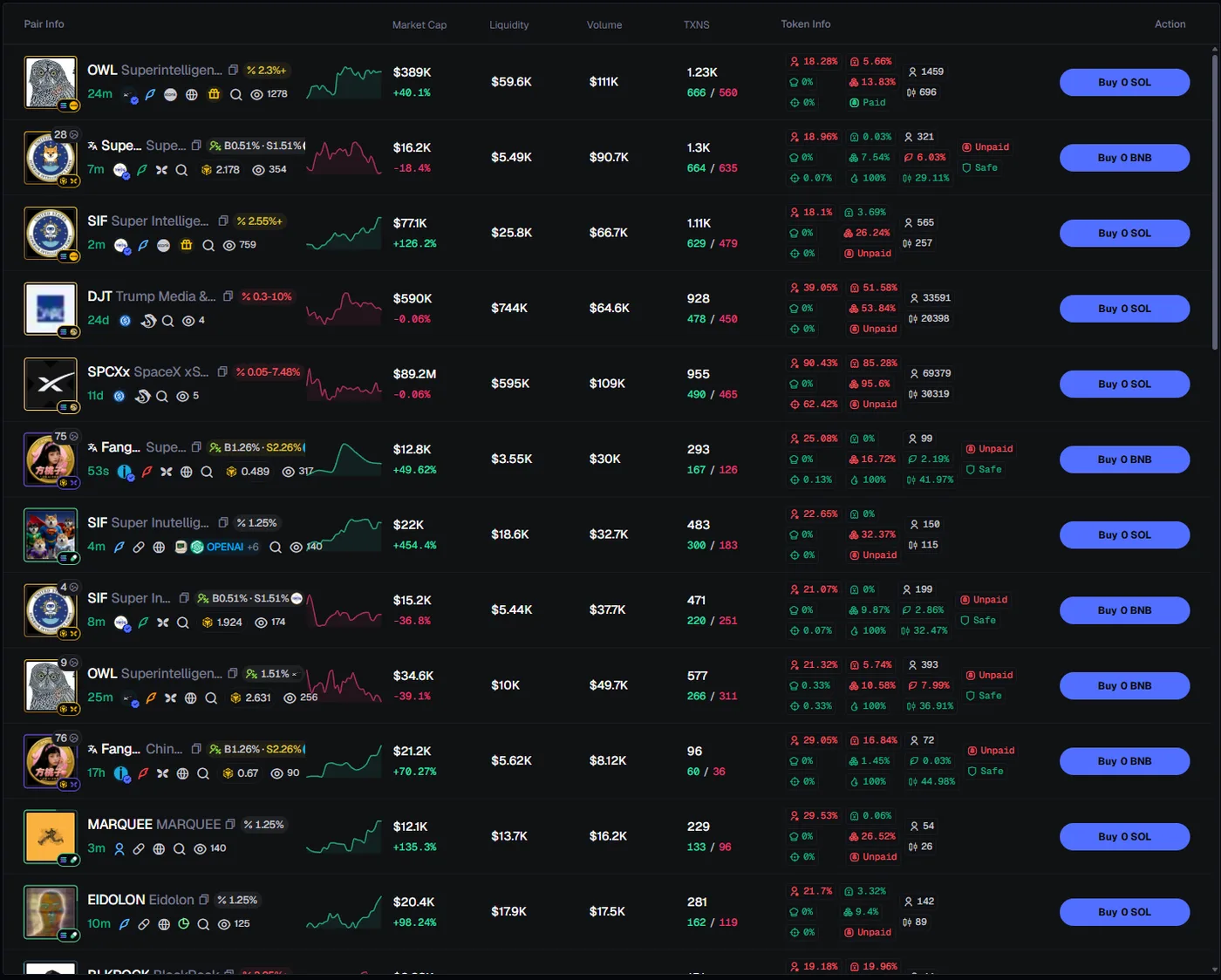
Do this before you press any Buy button. On Discover and Pulse, the Buy button on each row is a one-click buy that spends your Quick Buy amount.
- Quick Buy amount. The box above the table. Set it to a small figure while you learn.
- Presets P1, P2 and P3. Saved groups of settings you can switch between, for example a careful one and a fast one.
- Slippage. How far the price may move against you before the trade is cancelled. Too low and trades fail. Too high and you can overpay badly on a thin token.
- Priority fee and bribe. Extra you pay to get your transaction in faster. Axiom’s defaults are 0.001 SOL each.
- MEV mode. Off, Reduced or Secure. Axiom’s docs recommend Secure on buys to cut the risk of being sandwiched.
Before your first trade
- Quick Buy is set to an amount you would not mind losing.
- You have SOL left over for fees after the buy.
- MEV mode is on Secure.
- You know where Portfolio is, so you can sell.
Step 5: Find a token
Discover is the easiest place to start. Pick a tab (Top, Trending, Callouts or Streamers) and a time window from 1 minute to 24 hours. Each row shows the pair, market cap, liquidity, volume, number of transactions and a block of token info.
Read the row before you buy:
- Liquidity. Very low liquidity means your own buy and sell will move the price.
- Age. A token that is seconds old has no track record.
- Holder figures. A large share held by the top wallets, the developer, snipers or bundles is a warning sign.
Pulse shows launches earlier: New Pairs, Final Stretch (close to finishing the bonding curve) and Migrated. It moves faster and carries more risk, so leave it until Discover feels familiar.
Step 6: Make a small first trade
You have two ways to buy.
- From the list. Press Buy on the row. This is a one-click buy for your Quick Buy amount.
- From the token page. Click the token to open its chart. Here you can check the price history, choose your amount, and place a limit order that only fills at the price you set.
Use the token page for your first few trades. It is slower, and that is the point: you see what you are buying.
Open Axiom with code 'thanks'Step 7: Track the position and sell
Open Portfolio to see what you hold and what it is worth. Sell from the token page or from your position.
Decide your exit before you buy. A simple rule works: a price at which you take profit and a price at which you accept the loss. Memecoins move fast in both directions, and most go to zero.
What it costs
| Cost | Amount | Covered by code thanks |
|---|---|---|
| Axiom platform fee (spot) | 1% before cashback | Yes, 10% off this fee |
| Solana network fee | Set by the network | No |
| Priority fee and bribe | You choose; default 0.001 SOL each | No |
| Slippage | Depends on the token and your setting | No |
The fees page has the cashback tiers, and the fee calculator works out a trade for you.
Mistakes beginners make
- Pressing Buy on a list with a large Quick Buy amount. It is a one-click buy.
- Trusting a token name. Check the contract address.
- Spending every last SOL on tokens. Then there is nothing left to pay the fee to sell.
- Setting slippage very high to force a trade through. That is how you overpay.
- Starting with the sniper, copy trading or perpetuals. Learn a plain buy and sell first.
What to learn next
Once a basic buy and sell feels routine:
- How to copy trade on Axiom: follow wallets from the Trackers section.
- Axiom trading bots: the built-in migration sniper and limit orders.
- Trending and alerts: how to read the Discover lists and social alerts.
Frequently Asked Questions
How do I start using Axiom Trade?
Do I need a wallet to use Axiom Trade?
How much SOL do I need to start on Axiom?
What is Quick Buy on Axiom?
Is Axiom Trade hard to use for beginners?
What does it cost to trade on Axiom?
Can I use Axiom Trade on my phone?
Trading memecoins is high risk. Nothing on this page is financial advice. Only trade money you can afford to lose.
Related Articles
Axiom Trade Signup
Create the account with code 'thanks'
Read moreAxiom Copy Trading
Follow wallets once you know the basics
Read moreAxiom Trading Bot
The built-in sniper and limit orders
Read moreAxiom Trade Fees
What each trade actually costs
Read moreIs Axiom Trade Safe?
Custody, risks and what to check
Read more